
Scene Handles
A height, a width or a radius is easier to judge in the scene than as a number. In 1.3 any Float or Integer parameter can carry a Scene handle, so designers can drag a tower taller or an island wider directly in the Scene view.
Add a handle to a parameter
- Open the graph and its settings panel.
- On a Float or Integer parameter card, click the move icon.
- Choose a Scene handle kind, then set its options (below).
- Select the executor, or open the graph's Preview Stage, and pick the OctoShaper Handles tool in the Scene view.
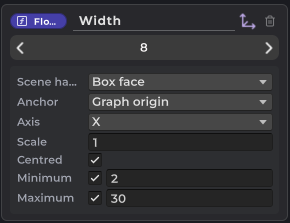
Three kinds of handle
| Kind | What you drag | Good for |
|---|---|---|
| Slider | A point moving along one axis | Heights, lengths, offsets |
| Box face | One face of a box. Parameters that share an anchor form a single box | Width, depth and height of a footprint |
| Radius | The rim of a disc whose normal is the chosen axis | Circular areas, scatter radii, tower radius |
Handle options
- Anchor: the Vector3 parameter the handle starts from, or the graph origin. Handles move with their anchor when it moves, so a box stays on its island while you drag the island with the Position tool.
- Axis: X, Y or Z, in the anchor's frame. For a radius it's labelled Normal: the axis the disc faces.
- Scale: world units per unit of value. A negative scale points the handle the other way along the axis, for example downwards for a depth.
- Minimum / Maximum: optional limits on the value.
- Centred: for sliders and boxes, the value is a full extent centred on the anchor (a width rather than a distance), with a handle on each side.
Where the value goes
Handles follow the same rule as every OctoShaper Scene view tool. With an active configuration, a drag writes a parameter override. Without one, it changes the parameter's default in the graph. Every drag is a single Undo step.
Handles respect the graph's authoring space. See handle space if a handle appears offset from your result.
From an AI agent or script
The automation CLI can set and read handles on parameters, so an agent can build a graph that is ready to drag. Handles are editor metadata only: they never affect execution or generated code.
Next: Drawing splines covers the other new Scene view tool in 1.3.